
Explore the catalogue

Every team.
Its own workspace.

Eight core ERP modules bring the student journey and institutional operations into one connected foundation.

Open the module workspace ↓
08 core modules 40 functional areasExplore, compare and validate
Indian medical students collaborating around a tablet in a learning room
Illustrative Indian setting · AI-generated

Student life & academic delivery

From the first application.
To the next semester.

Admissions, academic teams and student services work on different parts of the same journey. Connect the record so the next team can see the context it needs.

  • Admissions staff review the application and document checklist.
  • Faculty work with the relevant cohort, timetable and attendance records.
  • Authorised teams review assessment progress and pending service requests.
Explore the eight ERP modules ↗

The ERP suite

Eight modules.
One connected foundation.

Select a module to explore its functionality and the links that make it useful.

Academics

Connect academic structure, teaching schedules and student progression.

Academic structure

Department, program, course, subject, credit, theory/practical component and faculty mapping.

Terms and cohorts

Academic years, semesters, classes, sections and batches; capacity limits and student transfers.

Timetables

Working days, periods, rooms and faculty allocation; class, faculty and room views with conflict checks.

Attendance

Present, Absent and Late status; authorized corrections, period summaries and threshold alerts.

Academic history

Enrollment, subject registrations, progression and Active, Graduated or Discontinued status.

Admissions in practice

Every application.
A visible next step.

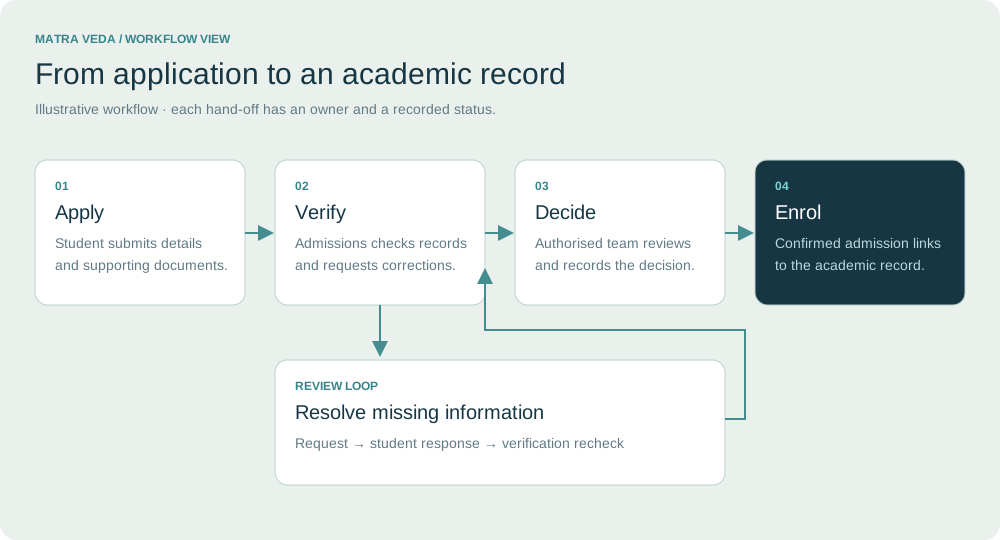
Documents move through verification, decisions and enrolment. Keep the correction loop visible so an incomplete record has a clear next action.

Indian student and parent reviewing admission documents with campus administrators
THE PEOPLE BEHIND THE RECORD

A student asks.
A team checks.
A record progresses.

Admissions is a series of accountable hand-offs. Define the responsible person and the evidence required at each stage.

Illustrative Indian setting · AI-generated
Application, verification, decision and enrolment with a missing-information review loop
Illustrative admissions workflow · not a live application screen.

The connected foundation

From the first application
to the next academic milestone.

One action becomes useful context for the next department.

01

Admit

Applicant and verified documents

02

Enroll

Student ID, program and subjects

03

Attend

Timetable and attendance records

04

Assess

Marks, review and approval

05

Publish

Results and academic history

Faculty ↔ Teaching

Employee records support teaching assignments. Approved leave flags affected classes for timetable review.
Documents ↔ Admissions

Verification informs admission decisions and keeps supporting records linked to the student.

Fees ↔ Student services

Mapped IDs connect ERP views to the existing fee system, with synchronization timestamps.

Shared masters: students, applicants, employees, programs, subjects, sections, terms, rooms, departments and roles. Access remains controlled by role.

Control across
every module.

Shared capabilities make the suite work as one ERP.

Role-specific dashboards

Institutional KPIs and integration health for administrators; application queues for registrars; timetable and marks tasks for faculty; own records for students; focused HR, examination and grievance workspaces.

User & role management

User accounts, activation and deactivation, department assignments and permissions for view, create, edit, approve, publish and export. Production access is enforced by backend authorization.

Notifications & settings

Relevant notifications, unread counts, timestamps and record links. Configure academic years, attendance thresholds, grading, approval rules, categories and escalation preferences.

Daily-use features

Permitted search, filters, sorting, pagination, validation, status indicators, confirmation controls, activity history, CSV exports and responsive layouts.

The core catalogue at a glance

Eight core modules.
40 functional areas.

Functional areas are grouped within modules. Use the map to compare coverage, then validate the workflows that matter in a demonstration.

Academics

  • Academic structure
  • Terms and cohorts
  • Timetables
  • Attendance
  • Academic history

Admissions

  • Applicant records
  • Processing
  • Verification
  • Decisions
  • Reporting

Administration

  • Institution profile
  • Organization
  • Calendar
  • Communications
  • Approvals

Documents

  • Repository
  • Categories
  • File handling
  • Verification
  • Access

HR and Staff

  • Employee directory
  • Employment records
  • Attendance
  • Leave
  • Reporting

Examination

  • Scheduling
  • Registration
  • Marks entry
  • Result governance
  • Student outcomes

Reports and Analytics

  • Executive visibility
  • Department reports
  • Relevant filters
  • Presentation
  • Exports

Grievance Redressal

  • Submission
  • Case management
  • Lifecycle
  • Escalation
  • Privacy and reporting

This count describes the core catalogue. The additional clinical, learning and campus-service requirements below are scoped separately.

Additional workflows to scope

Medical education has
its own operating rhythm.

The core suite covers institutional administration. These specialised requirements need a workflow review and a demonstration before inclusion in an implementation.

01

Clinical postings & logbooks

Define department, cohort, placement dates and supervisor. Map supervised activities to a reviewable student learning record.

What to agree before rollout

A posting is complete only when the designated supervisor reviews the required evidence.

02

Learning resources & mentoring

Connect course materials, assignments and mentoring conversations to the relevant cohort. Agree which LMS owns content and grades.

What to agree before rollout

Decide what is shared with the ERP, and what stays within the learning platform.

03

Practical & competency assessment

Scope practical stations, viva schedules and supervisor assessment templates alongside existing examination records.

What to agree before rollout

Institution-approved criteria and authorised review govern any competency sign-off.

04

Faculty workload & research

Extend faculty context to teaching, clinical supervision and research activity. Organise publication and project references.

What to agree before rollout

Validate ownership, update frequency and evidence before using research data in reports.

05

Inspection evidence workspace

Map requested evidence to records, document owners, review dates and export packs. Make missing information visible.

What to agree before rollout

Reporting supports institutional review; it does not certify accreditation or regulatory compliance.

06

Feedback & student support

Scope structured course feedback, mentoring referrals and restricted conduct case records. Keep confidential cases separate from general surveys.

What to agree before rollout

Agree who sees individual responses and how actions are reviewed.

Student services beyond the classroom

One student context.
Several service teams.

Library & e-resources

Catalogue, journal access, borrowing history and clearance status; connect to the existing library system where appropriate.

Hostel & transport

Room allocation, occupancy, transport routes and linked charges, with a clear service owner.

Scholarships & concessions

Applications, supporting documents, approval status and fee adjustments owned by the authorised finance system.

Certificates & clearance

Approved templates for bonafide, transfer and completion documents; define verification and issue authority.

These are additional requirement areas, not a claim that new modules are already live. Agree the delivery method, permissions and acceptance criteria for each selected workflow.

Discuss your college requirements ↗

Leadership analytics

From activity.
To an operating view.

Explore three sample views. Each translates a different workflow into a question, an exception and a next step.

MATRA HEALTH / INSIGHTS

Institutional command view

Illustrative data

Application stages

Sample figures explain the reporting experience. They are not live institution data or measured product outcomes.

01

Admissions visibility

Review applications by course, check verification backlogs and track conversion between stages.

02

Academic oversight

Compare attendance thresholds, assessment completion and progression across cohorts.

03

Service accountability

Inspect request age, assigned ownership and closure status to focus operational reviews.

Turn the catalogue into an implementation plan.

See the five priorities, from core validation to selected campus services.

View the implementation approach ↗

Frequently asked questions

Clear answers.
Before the next step.

Understand the scope, dependencies and decisions that matter for your institution.

Which eight core modules are in the catalogue?

Academics, Admissions, Administration, Documents, HR and Staff, Examination, Reports and Analytics, and Grievance Redressal. Each contains five functional areas, detailed in the explorer and coverage map.

Are clinical logbooks, library and hostel workflows part of the eight modules?

They appear as additional requirement areas on this website. Confirm whether each will be configured, integrated or developed, and request a demonstration before treating it as included functionality.

Can academic workflows be tailored to our institution?

Programme structures, terms, grading, attendance thresholds and approval rules are implementation requirements to review. Specific curriculum, competency and inspection formats must be agreed with the institution; software does not certify regulatory compliance.

Can students and faculty access different information?

The described ERP scope includes role-specific views and permissions. During implementation, agree who can view, create, approve, publish or export each record, then verify those permissions with representative accounts.

Does the website show real institutional analytics?

No. The interactive dashboards use clearly labelled sample data to illustrate management questions and actions. Production reporting requires your authorised data sources and agreed definitions.

Explore the fit for your institution.

Start with your workflows, current systems and priorities.

Send an enquiry ↗