Web + Mobile
Role-specific workflows across web and mobile delivery. Responsive browser access supports smaller screens; supported app operating systems and workflow parity are defined during implementation.
From agreement to adoption
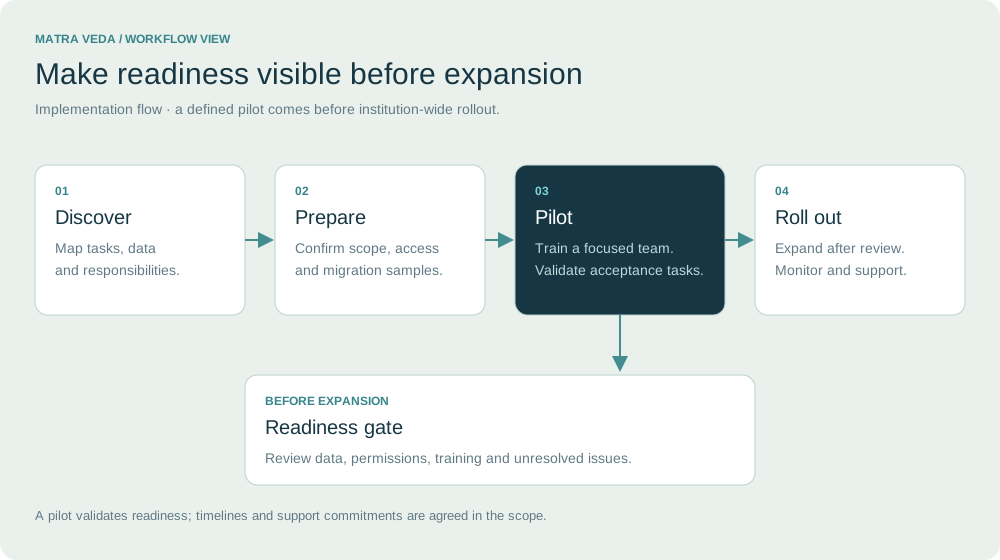
Begin with the work that matters. Demonstrate it with your team. Expand when the institution is ready.
Choose your priorities ↓Workflows, owners and acceptance criteria
A focused pilot with representative users
Data, integrations, training and recovery
Review readiness and support daily use

Implementation with your team
An implementation works when people understand their own workflow. Begin with a practical pilot, train teams on everyday tasks and use their feedback to refine the rollout.
Deployment and configuration follow the agreed implementation plan.
Role-specific workflows across web and mobile delivery. Responsive browser access supports smaller screens; supported app operating systems and workflow parity are defined during implementation.
Development and deployment on the institution’s local server, with a cloud-integration option.
Delivery scope for 1,500-5,000 students without additional student-capacity charges; performance and access checks during acceptance testing.
Institutional source-code ownership with source, operating documentation and deployment handover.
Tender-compatible backend choices: PHP/Laravel, Node.js or Django. Frontend: HTML5, CSS3, JavaScript, React or Vue. Database: MySQL or PostgreSQL. Final stack is agreed during design.
Development, implementation, deployment, training, support and maintenance belong in one delivery plan.
Confirm workflows, institutional rules, data sources, API contracts and acceptance criteria.
Implement the modules, production database, protected storage, permissions and provider connections.
QA, integration and capacity checks; institutional user acceptance and local-server rollout.
Role-based training, operating documentation, source code and deployment handover.
Dedicated/toll-free support number, escalation matrix, change handling and ongoing maintenance; minimum one-year post-deployment support in the tender delivery scope.
Execution plan, milestones/Gantt chart, architecture, database schema, QA plan, change-management process and maintenance/support plan.
Adoption & value
Agree a baseline before rollout. Compare the same workflows after adoption, with the same definitions and reporting window.
| Workflow | Baseline to capture | Review after adoption |
|---|---|---|
| Admissions | Time from application to verified decision | Stage age, pending documents and completion time |
| Academic administration | Time to prepare attendance and assessment reports | Reporting turnaround and correction volume |
| Service requests | Unassigned cases and age of open requests | Ownership coverage and closure time |
| Connected systems | Manual reconciliation work and missing records | Successful syncs, exceptions and time to resolve |
| AI-assisted tasks | Time spent on the selected manual task | Time saved, review effort and correction rate |
No preset savings or clinical outcome improvements are assumed. Targets and acceptance measures are agreed with the institution.
A practical implementation approach
Start with a demonstrated foundation, connect medical learning and add the services that your institution needs.
Walk through admissions, academics, administration, documents, HR, examinations, reporting and grievances with representative users. Confirm complete workflows and permissions against the agreed scope.
Explore the core catalogue ↗Define placements, supervisors and learning records. Demonstrate attendance, documentation, supervisor review and outstanding actions before extending the pilot.
Explore clinical learning ↗Review the existing LMS and library systems first. Agree identity mapping, course links, authorised progress information and borrowing or clearance exchanges.
Explore service connections ↗Scope practical assessment templates, review authority and evidence packs. Check document completeness and export formats against institution-approved requirements.
Explore academic requirements ↗Prioritise hostel, transport, scholarships and certificates according to demand. Agree the owner, delivery method and acceptance task for each selected service.
Explore campus services ↗Additional clinical, learning and campus-service workflows require agreed configuration, integration or development. Validate selected functionality in a demonstration and document it in the implementation scope.
Discuss your implementation priorities ↗A practical medical-college pilot
For every additional workflow, agree the owner, source data and a concrete acceptance task.
Validate the academic structure and the proposed posting workflow with the people who run it.
Check record completeness, document ownership and authorised export before relying on inspection reporting.
Follow a library clearance or certificate request from submission to reviewed completion.
Document what is configured, integrated or developed; confirm dependencies and acceptance criteria before expansion.
Frequently asked questions
Understand the scope, dependencies and decisions that matter for your institution.
Institutional-server and cloud deployment options are described in the proposed implementation approach. Confirm the production architecture, infrastructure, access and operational responsibilities in the agreed scope. This public website is separate from the ERP application.
Start with a sample export from each source. Agree field mapping, data cleaning, duplicate handling and validation responsibilities. Migration scope and acceptance checks should be documented before importing production records.
There is no single timeline for every institution. The schedule depends on selected workflows, data readiness, integrations and team availability. Agree milestones after discovery and use a pilot to validate readiness.
Define role-based training, departmental champions, issue escalation, support hours and response expectations in the implementation and support agreement. The website does not promise a universal support SLA.
Agree source-code and data handover, backup frequency, recovery testing, retention and access responsibilities in the contract. Validate the restore process and export formats before accepting the deployment.
Pricing is based on the agreed scope, deployment, users, migration, integrations and ongoing support. Request an itemised proposal that separates implementation, recurring services and third-party charges.
Start with your workflows, current systems and priorities.