Student fee view
Total fees, paid amount, outstanding balance and payment status, with transaction dates, references and available receipts.
The connected systems view
Keep the source of truth clear. Bring the information your teams need into the workflow.
Explore the integration blueprint ↓Identity mapping · Permissions · Exception review
Conceptual view; connections depend on agreed scope and provider support.
People behind the connections
A connected system supports the people who use it every day. Clinical teams, administrators and IT staff need a clear view of what is current, what is missing and who will resolve it.
The existing fee system remains the financial source of record, connected through its REST API.
Total fees, paid amount, outstanding balance and payment status, with transaction dates, references and available receipts.
Filters by year, department, course and payment status; outstanding summaries and collection views.
Mapped student IDs, API connection status, refresh, last successful sync and records with synchronization errors.
External fee records remain controlled by the existing fee system. Payment initiation follows the agreed gateway and API scope.
Relevant status and history for each connected service.
Sender configuration, notification categories, delivery history and test-connection controls.
Device/provider status, received attendance records, synchronization timestamps and failed records.
Provider and sender configuration, notification categories, delivery history and status.
Provider status, transaction references, success and failure counts and synchronization visibility.
Connected, Disconnected, Configuration Required and Sync Error states. Production credentials remain protected on the server.
The integration blueprint
A successful connection needs more than an API: a clear source of truth, reliable identity mapping and visible exception handling.
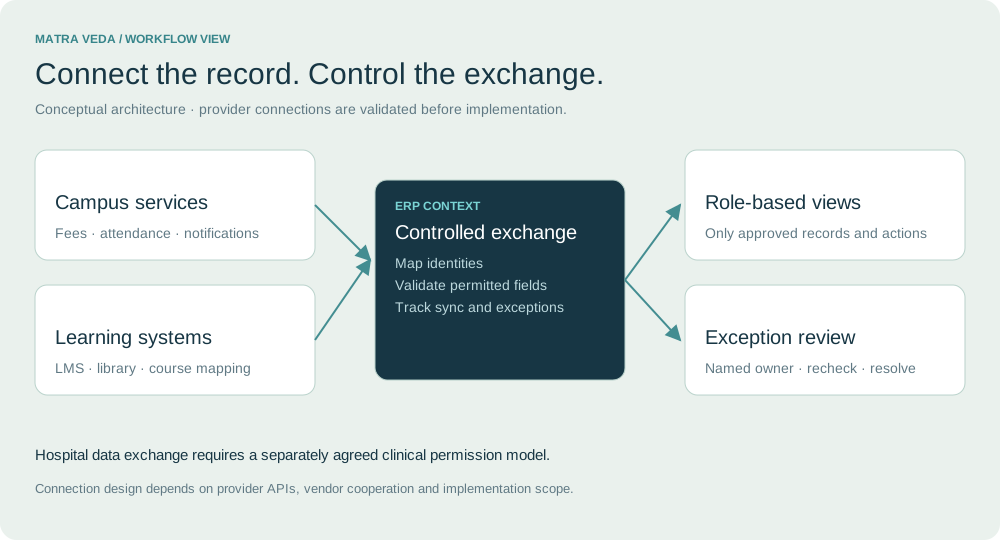
Agree which system owns each record, field and correction. Keep financial edits with the authorised financial source.
Track last sync, rejected records and provider errors. Route unresolved exchanges to a responsible administrator.
Scope permissions and data exchange to the approved workflow. Confirm vendor support before promising interoperability.
Additional connections to assess
Extend the integration review beyond payments and attendance when the institution needs a broader campus and learning workflow.
Agree student identity, course mapping and the limited progress or clearance information to exchange.
See learning requirements ↗Define the permitted link between student postings and the teaching hospital. Keep educational and clinical permissions explicit.
See clinical learning ↗Review scholarship adjustments, service charges and payroll connections. Preserve the authoritative financial system.
See service requirements ↗Provider APIs, data permissions and vendor cooperation must be verified. These connections are assessment areas, not confirmed live integrations.
Frequently asked questions
Understand the scope, dependencies and decisions that matter for your institution.
The integration scope covers fee records, email, biometric attendance, SMS and payment gateways. A live connection depends on the provider API, identity mapping, credentials, permissions and vendor cooperation.
The described integration preserves the existing fee system as the financial source of record. ERP views show permitted payment and balance information. Any payment initiation or financial changes need a separately agreed scope.
Update frequency depends on the provider and integration design. Agree refresh intervals, last-successful-sync visibility and how rejected or delayed records are resolved; do not assume every service supports instant updates.
These are additional integration areas to assess. Define the limited data to exchange, the responsible system and the permissions. A teaching-hospital link needs explicit separation of educational and clinical access.
Start with your workflows, current systems and priorities.